Menos caos. Más control. Mantén Airbnb sincronizado
Tus calendarios, disponibilidad, precios y mensajes con huéspedes se actualizan automáticamente para que tu alojamiento funcione como la seda cada día.


Valoración de 4.8 basada en más de 4.000 opiniones
¿Por qué usar un channel manager para Airbnb?
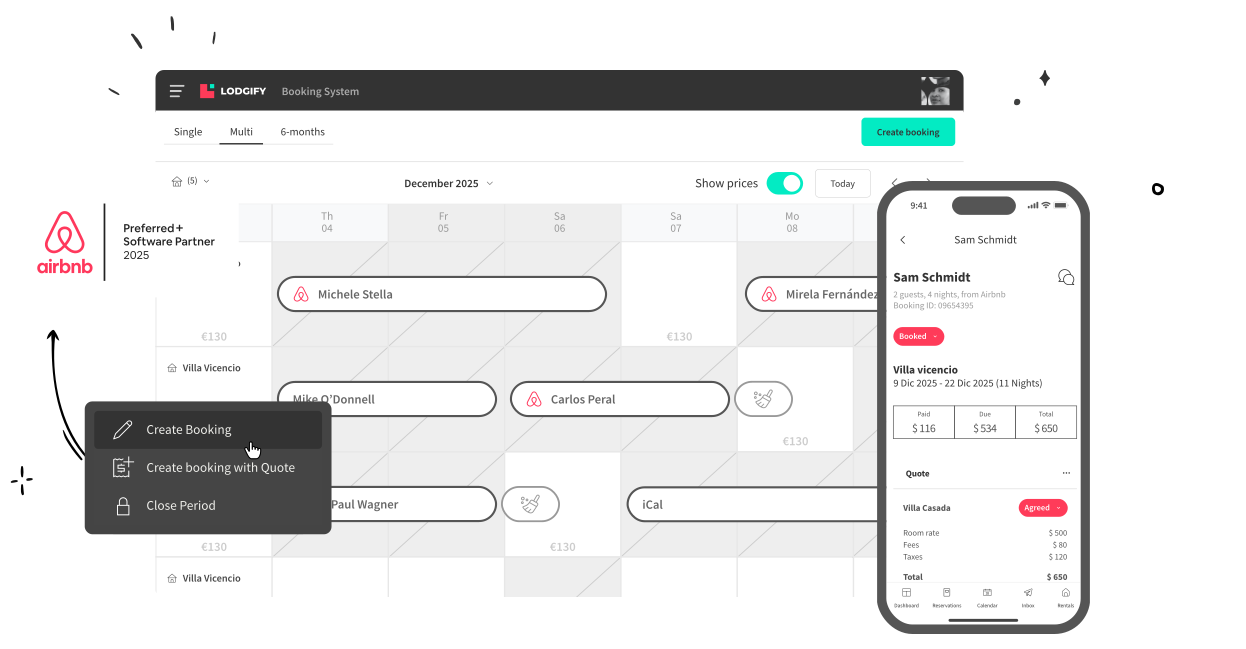
Tus reservas, tarifas, calendarios, disponibilidad y mensajes con tus huéspedes se mantienen actualizados en todos los portales de reserva. Sin errores y sin tareas manuales.
Evita reservas duplicadas
Tu calendario se actualiza en cuanto entra una reserva y la disponibilidad de tu alojamiento se sincroniza con todos los portales.
Fija precios competitivos
Tus tarifas base y de temporada se sincronizan solas. Define tu estrategia de precios una vez y deja que Lodgify la aplique en Airbnb y el resto de canales.
Centraliza los mensajes de tus huéspedes
Tus conversaciones dentro Airbnb y del resto de portales se centralizan en una única bandeja de entrada. Respondes más rápido y tienes a mano todos los datos de tus huéspedes.
Olvídate de las tareas manuales
Las fotos de tu alojamiento, descripción, servicios, tipos de habitación… Toda la información se actualiza en tiempo real tus canales de reserva.
Una conexión con Airbnb que funciona a la primera
Diseñada para cumplir los estándares más altos
Lograr el distintivo Preferido+ de Airbnb implica superar una auditoría técnica y de rendimiento muy exigente. Airbnb comprueba que la conexión sea estable, segura y cumpla con todos sus requisitos. Solo las plataformas que pasan este filtro, como Lodgify, reciben la insignia.
.png)
Configuración rápida y sencilla desde el primer clic
La sincronización con Airbnb estará lista en pocos minutos. Nuestro proceso de configuración guiado te permitirá conectar todos tus canales de reserva de forma rápida y sencilla. Y si necesitas ayuda adicional, nuestro equipo te asesorará y te acompañará en todos los pasos.







Lodgify cuenta con la confianza de propietarios y gestores de alquiler vacacional en más de 180 países
He estado usando Lodgify para gestionar varios anuncios en Airbnb, Booking.com y Vrbo, y me ha facilitado mucho la vida
El channel manager mantiene todos los calendarios perfectamente sincronizados, y el creador de páginas web me ayudó a lanzar rápidamente mi propia web de reservas directas.

92%
Tasa de confianza de anfitriones independientes
Lodgify ha sido nombrada la mejor aplicación de alquileres vacacionales durante 4 años consecutivos.
4,9-5
Calificación por estrellas en nuestra aplicación
Lodgify ha sido nombrada la mejor aplicación de alquileres vacacionales durante 4 años consecutivos.
89%
de las reseñas son de 5 estrellas
Los anfitriones recomiendan Lodgify por su facilidad de uso, su potente automatización y su diseño limpio.
4,85
de valoración en Trustpilot
Lodgify es reconocida como la mejor solución para propietarios y gestores de alquileres en todo el mundo.
4.8/5
rating on Trustpilot
Hosts consistently praise Lodgify for its ease of use, powerful automations, and clean design.
89%
of all reviewers gave 5 stars
Lodgify is recognized as a leading solution for independent hosts worldwide.
Liderando la industria desde 2012
Lodgify es líder de mercado en el sector del alquiler vacacional desde hace más de 14 años, y se ha ganado la confianza de cientos de miles de propietarios y gestores de alquiler vacacional en todo el mundo.

¿Sigues teniendo dudas?
O, si lo prefieres:
You can sync your Airbnb calendar, bookings, availability up to 3 years, rates, images, descriptions, messages, and more! Check out the full list in our Lodgify Help Center.
Lodgify Help Center
Nope! The connection requires zero maintenance from your side. Besides, advice is always available from our dedicated connectivity team at any time.
Yes! If you are new to Lodgify or you have just created a new rental in Airbnb, you can import it directly into Lodgify without filling in all the information from scratch. It only takes four easy steps to connect your Lodgify account to Airbnb and import the crucial rental information. Get more information about our Import tool in the following link.
Lodgify Import Tool
Yes, Lodgify can connect to multiple Airbnb accounts. If you want to connect additional Airbnb accounts, go to your left-hand menu, select Channel Manager, and click Airbnb. Then, select Manage account and click on Connect another account.Then follow the above procedure for each of your Airbnb accounts to connect.
To set up the connection between Lodgify and Airbnb, follow the steps below:
1.Go to your left-hand menu and select Channel Manager. Then click Connect below the Airbnb icon to sign in to your Airbnb account or create one.
2. Establish the connection by agreeing to the terms and conditions of the two platforms.
3. To set up a new connection or add a new rental to your existing connection, you will need to fill in a form providing some additional information to establish the mapping. Select the form in your preferred language (English, Spanish, Italian, French, German, or Portuguese) and complete it with the required information regarding your rental(s). Once submitted, we will start the mapping.Note: You can also access the form from the Channel Manager section of your Lodgify account when you click on Connect to create a new connection.
4. You will receive a confirmation email once everything is set up.
Lodgify ofrece un channel manager para Airbnb que te permite sincronizar los calendarios de todos los portales de reserva en una única plataforma centralizada.
If you want to sync your Airbnb calendar with Tripadvisor, first you’ll need an Airbnb channel manager like Lodgify. This tool will allow you to automatically synchronize all your bookings, listings, and rates via iCal connection.
Alternatively, to synchronize your Airbnb calendar with Tripadvisor, you can also log in to Tripadvisor, and go to the "Calendar" tab. After selecting "Export Calendar," you will see your iCalendar link. Copy and paste this link into Airbnb’s "Calendar Address" field.
If you want to sync your Airbnb calendar with Booking.com, you’ll need an Airbnb channel manager like Lodgify. This tool will allow you to automatically synchronize your bookings, listings, and rates via API integration.
To synchronize your Airbnb and Booking.com calendars, all you need to do is fill out an online form provided by our connectivity team. Once you have accepted the connection requirements, your Booking.com account will be connected to Lodgify. You can then sync it with your Airbnb calendar to manage all your listings from a centralized platform.
Alternatively, you can also log in to the Booking Extranet, and click on "Calendar." Select "Sync calendars" and then click on "Add calendar connection." Scroll down and click "Skip this step." Title your connection and click "Export Calendar." The last step is to copy the link and paste it into Airbnb’s "Calendar Address" field.
Learn more here
If you want to synchronize your Airbnb calendar with Vrbo, you will need an Airbnb channel manager like Lodgify. This tool will allow you to automatically synchronize your bookings, listings, and rates via API integration.
Lodgify has been recommended by Vrbo as an Elite Partner (Vrbo's highest partnership status). This means that we provide the full connectivity that property owners and managers need to grow their vacation rental business.
Learn more here
The best channel manager for Airbnb is one that supports integrations with numerous other booking channels, syncs your availability as well as other listing details, and features additional automation and optimization features. You'll also want to look for a company that provides flexible pricing options as well as free onboarding and ongoing support.
Find the best channel manager for Airbnb here
If you list your vacation rental on more than just Airbnb, an Airbnb channel manager is crucial to your business's success. Using an Airbnb channel management solution helps ensure your availability is always up to date and accurate across all your booking channels, preventing double and over bookings. The same goes for pricing and other listing details: You won't need to worry about making manual adjustments from different accounts, because your Airbnb channel manager keeps everything synced.
This not only saves you time, but also prevents human error and inspires trust in your potential guests.
A channel manager for Airbnb is a software solution that syncs your Airbnb listings with your other third-party booking channels and your direct booking website. This enables you to sync availability, pricing, and other listing details across all your booking channels, preventing double bookings and helping you to better manage your vacation rentals.