Less chaos. More control. Connect to Airbnb now
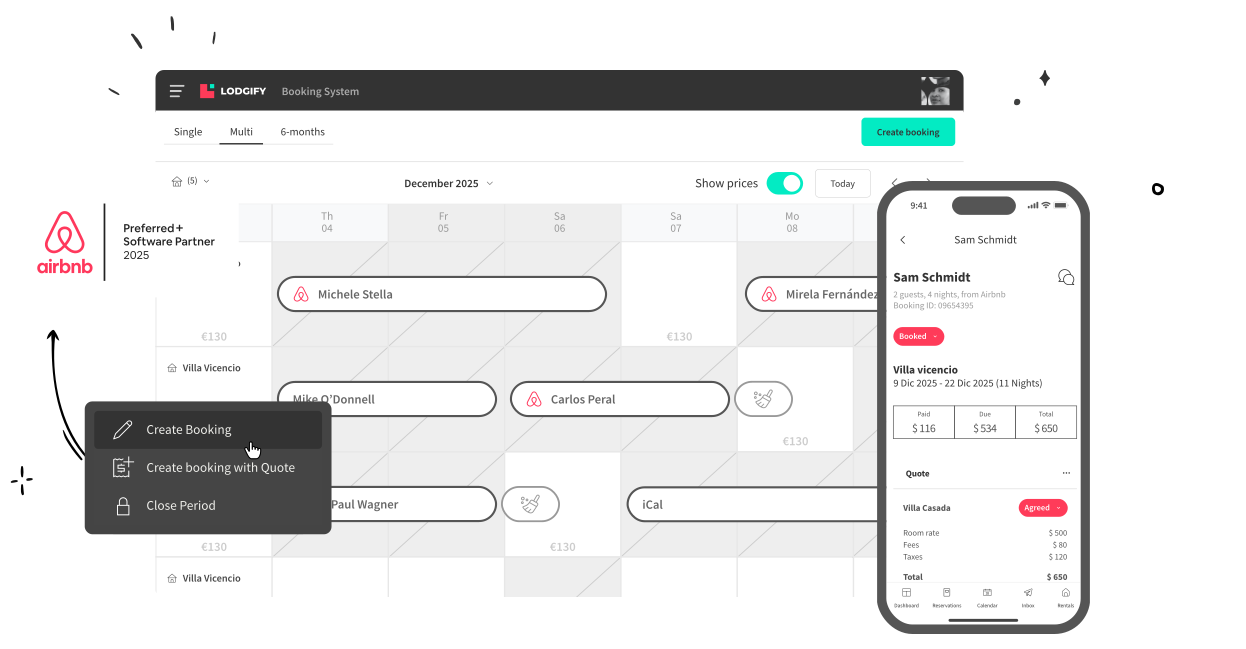
Your calendars, pricing, and guest communication stay seamlessly aligned—so your rental runs smoothly, automatically.


4.8 average rating based on 4k reviews
Why Use a Channel Manager for Airbnb
Your bookings, prices, and guest details stay consistent everywhere you list. No guesswork, no repeats, no late-night fixes. Lodgify handles the heavy lifting so you can focus on hosting—not juggling tabs.
No more double bookings
Your calendar updates the moment a reservation comes in. Future availability and existing bookings stay perfectly aligned across every booking site. No overlaps—ever.
Always accurate pricing
Your default and seasonal rates sync automatically. Set your strategy once, and Lodgify updates Airbnb for you—keeping your revenue on track.
All guest messages in one inbox
Your conversations from Airbnb and other booking sites all land in one AI-powered inbox. Automations help you reply faster, stay consistent, and keep every guest detail at your fingertips.
No more manual copy-paste
Your property details flow from Lodgify to Airbnb. Photos, amenities, and room types stay consistent, ensuring travelers always see the right information.
Airbnb Connection That Just Clicks
Built to meet the highest standards
When a platform earns Airbnb’s “Preferred+” status, it means Airbnb has conducted a deep technical and performance audit. They verify that the connection is stable, secure, and fully compliant with their standards. Only software that meets these requirements earns the badge.
.png)
Seamless setup—from first click to live listing
You follow a clear, step-by-step flow that removes the guesswork from connecting to Airbnb. Lodgify handles the technical work in the background, so you can activate your sync in minutes and manage everything from one place. And if you ever need help, our onboarding team is ready to guide you through the setup.







Lodgify is trusted by hosts in 180+ coutries
I’ve been using Lodgify to manage several listings across Airbnb, Vrbo, and Booking, and it has made my hosting life so much easier.
The channel manager keeps all calendars perfectly synchronized, and the website builder helped me quickly launch my own direct booking site.

92%
Trust rate from independent hosts
Lodgify has been named the best vacation rental app for 4 years straight.
4.9/5
Star rating on our app
Lodgify has been named the best vacation rental app for 4 years straight.
89%
of 5-star reviews on Trustpilot
Hosts consistently praise Lodgify for its ease of use, powerful automations, and clean design.
4.8/5
rating on Trustpilot
Lodgify is recognized as a leading solution for independent hosts worldwide.
4.8/5
rating on Trustpilot
Hosts consistently praise Lodgify for its ease of use, powerful automations, and clean design.
89%
of all reviewers gave 5 stars
Lodgify is recognized as a leading solution for independent hosts worldwide.
Industry Leaders Since 2012
Lodgify has been a market leader in the vacation rental industry for over 14 years, earning the trust of hundreds of thousands of independent hosts worldwide.

Still Have Questions?
Or, you can also
You can sync your Airbnb calendar, bookings, availability up to 3 years, rates, images, descriptions, messages, and more! Check out the full list in our Lodgify Help Center.
Lodgify Help Center
Nope! The connection requires zero maintenance from your side. Besides, advice is always available from our dedicated connectivity team at any time.
Yes! If you are new to Lodgify or you have just created a new rental in Airbnb, you can import it directly into Lodgify without filling in all the information from scratch. It only takes four easy steps to connect your Lodgify account to Airbnb and import the crucial rental information. Get more information about our Import tool in the following link.
Lodgify Import Tool
Yes, Lodgify can connect to multiple Airbnb accounts. If you want to connect additional Airbnb accounts, go to your left-hand menu, select Channel Manager, and click Airbnb. Then, select Manage account and click on Connect another account.Then follow the above procedure for each of your Airbnb accounts to connect.
To set up the connection between Lodgify and Airbnb, follow the steps below:
1.Go to your left-hand menu and select Channel Manager. Then click Connect below the Airbnb icon to sign in to your Airbnb account or create one.
2. Establish the connection by agreeing to the terms and conditions of the two platforms.
3. To set up a new connection or add a new rental to your existing connection, you will need to fill in a form providing some additional information to establish the mapping. Select the form in your preferred language (English, Spanish, Italian, French, German, or Portuguese) and complete it with the required information regarding your rental(s). Once submitted, we will start the mapping.Note: You can also access the form from the Channel Manager section of your Lodgify account when you click on Connect to create a new connection.
4. You will receive a confirmation email once everything is set up.
To sync Airbnb with your Google Calendar, go to your Airbnb dashboard and click on "Listings." Click on "Availability" and then under "Sync Calendar," select "Import Calendar." Copy the URL from Google Calendar into the "Calendar Address" field, name the calendar, and then click "Import Calendar."
Lodgify offers an Airbnb channel manager that will help simplify this process and allow you to automatically sync calendars from different channels into one centralized platform.
If you want to sync your Airbnb calendar with Tripadvisor, first you’ll need an Airbnb channel manager like Lodgify. This tool will allow you to automatically synchronize all your bookings, listings, and rates via iCal connection.
Alternatively, to synchronize your Airbnb calendar with Tripadvisor, you can also log in to Tripadvisor, and go to the "Calendar" tab. After selecting "Export Calendar," you will see your iCalendar link. Copy and paste this link into Airbnb’s "Calendar Address" field.
If you want to sync your Airbnb calendar with Booking.com, you’ll need an Airbnb channel manager like Lodgify. This tool will allow you to automatically synchronize your bookings, listings, and rates via API integration.
To synchronize your Airbnb and Booking.com calendars, all you need to do is fill out an online form provided by our connectivity team. Once you have accepted the connection requirements, your Booking.com account will be connected to Lodgify. You can then sync it with your Airbnb calendar to manage all your listings from a centralized platform.
Alternatively, you can also log in to the Booking Extranet, and click on "Calendar." Select "Sync calendars" and then click on "Add calendar connection." Scroll down and click "Skip this step." Title your connection and click "Export Calendar." The last step is to copy the link and paste it into Airbnb’s "Calendar Address" field.
Learn more here
If you want to synchronize your Airbnb calendar with Vrbo, you will need an Airbnb channel manager like Lodgify. This tool will allow you to automatically synchronize your bookings, listings, and rates via API integration.
Lodgify has been recommended by Vrbo as an Elite Partner (Vrbo's highest partnership status). This means that we provide the full connectivity that property owners and managers need to grow their vacation rental business.
Learn more here
The best channel manager for Airbnb is one that supports integrations with numerous other booking channels, syncs your availability as well as other listing details, and features additional automation and optimization features. You'll also want to look for a company that provides flexible pricing options as well as free onboarding and ongoing support.
Find the best channel manager for Airbnb here
If you list your vacation rental on more than just Airbnb, an Airbnb channel manager is crucial to your business's success. Using an Airbnb channel management solution helps ensure your availability is always up to date and accurate across all your booking channels, preventing double and over bookings. The same goes for pricing and other listing details: You won't need to worry about making manual adjustments from different accounts, because your Airbnb channel manager keeps everything synced.
This not only saves you time, but also prevents human error and inspires trust in your potential guests.
A channel manager for Airbnb is a software solution that syncs your Airbnb listings with your other third-party booking channels and your direct booking website. This enables you to sync availability, pricing, and other listing details across all your booking channels, preventing double bookings and helping you to better manage your vacation rentals.